

Start with one question: when an agent runs a bash command, should it wait for the command to finish?
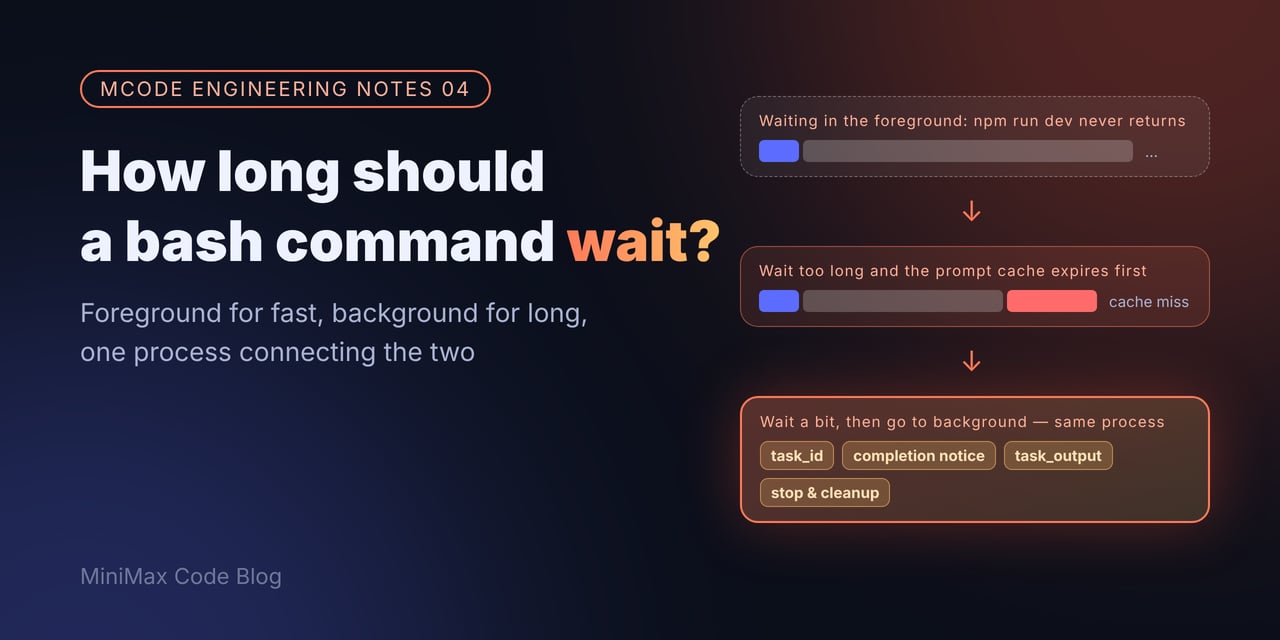
A scene everyone has seen
You ask an agent to “start the server and take a look.” It typesnpm run dev, and then nothing. A dev server never exits on its own, so the agent just sits there waiting.
This isn’t a one-off. Someone on X listed the most common ways agents fall over, and this was number two: “Hanging processes. A dev server or watcher that never returns, and the loop just sits there.”
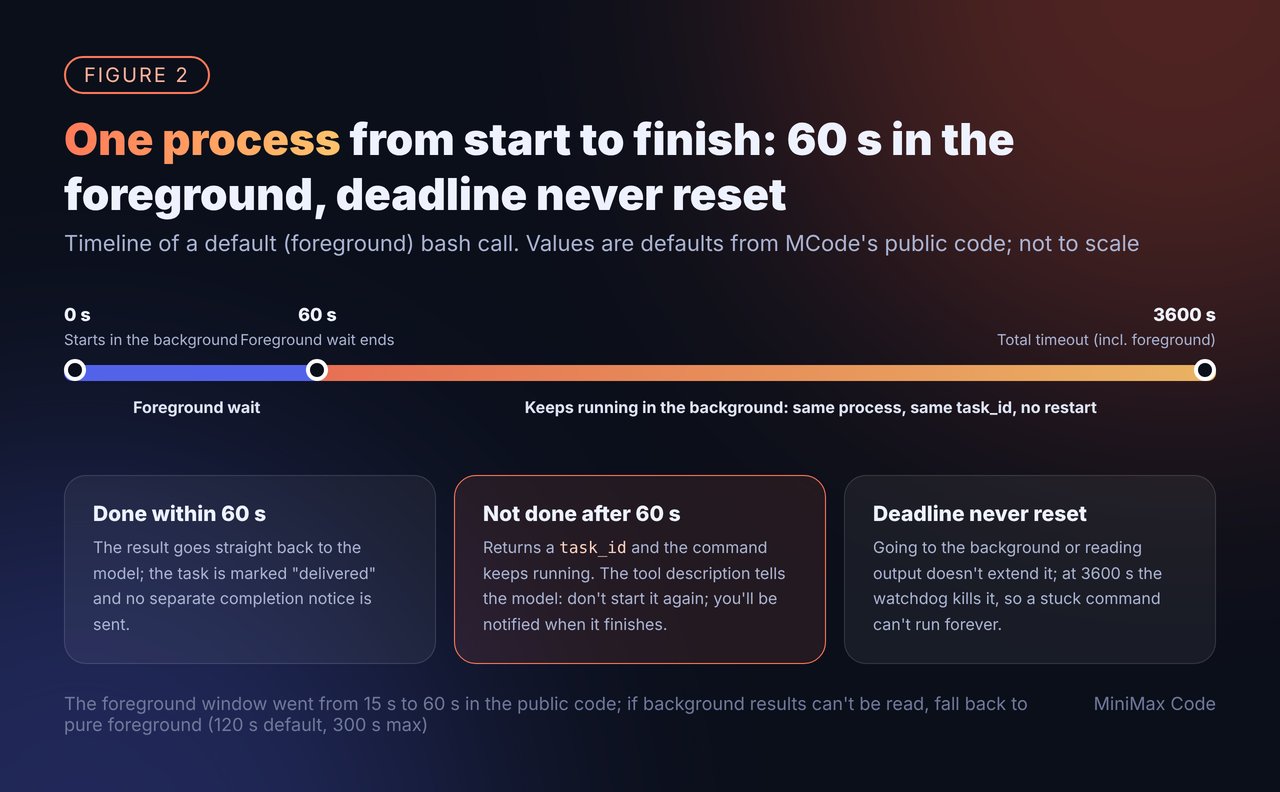
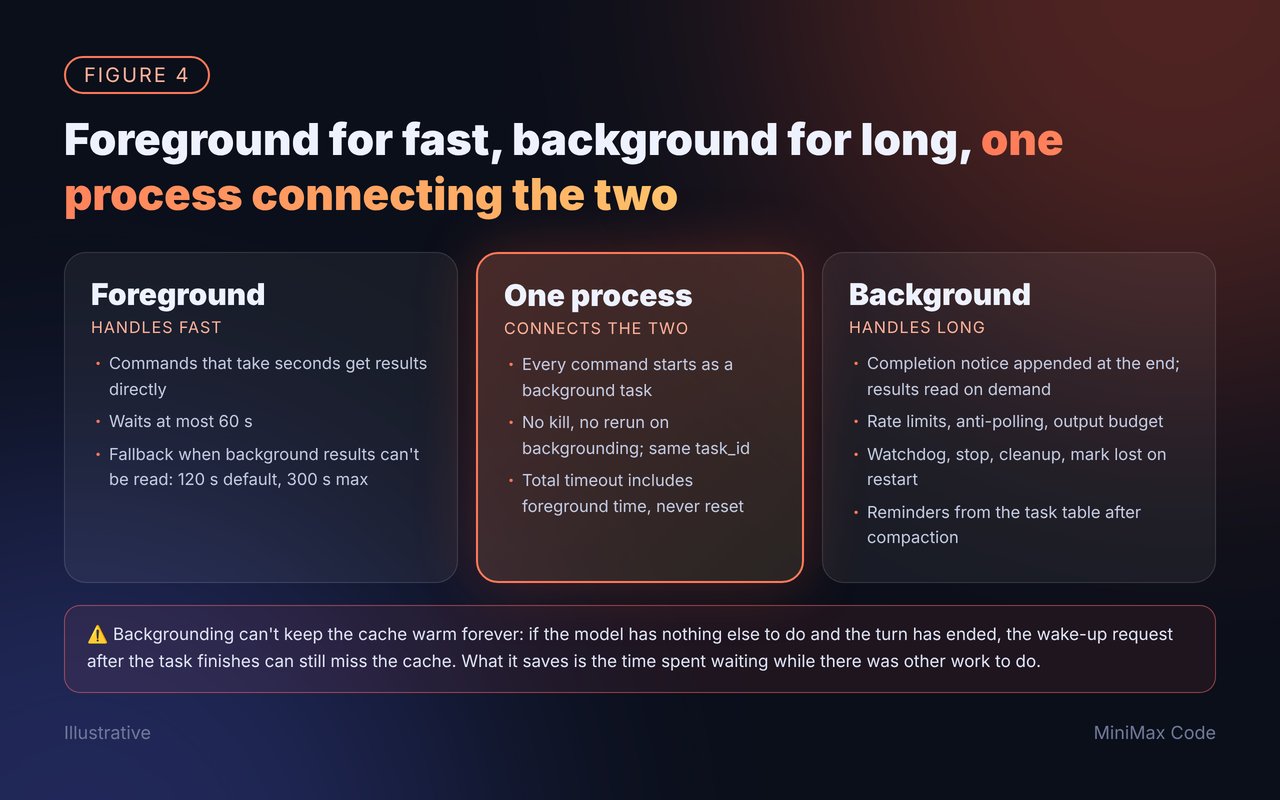
The most obvious approach is to wait for the command to finish, feed the output back, and let the model keep thinking. To avoid hanging forever, add a timeout. MCode has always had this path, and today it’s the fallback: a 120-second timeout by default, 300 seconds at most.
For commands like ls or git status that take a few hundred milliseconds, this is the best possible answer. But a dev server, a full test suite, or a complete build either never finishes or takes several minutes. Killing it when the timeout hits means the whole run was wasted.
How others do it
The mainstream approach has pretty much converged: run long commands in the background. Take Claude Code. Its docs spell it out: a background command immediately returns a task ID, its output goes to a file, and Claude reads it later; the user can pressCtrl+B to move a running command to the background (someone on X even put together a rundown of this and other shortcuts); and a command that hits its timeout without finishing is moved to the background automatically instead of being killed.
That answers “what about the dev server”: it runs in the background and the agent keeps working. But one question is still open:
If a command takes 3 minutes and finishes normally, why not just raise the timeout and wait for it patiently?
Why you can’t just wait: the cache expires
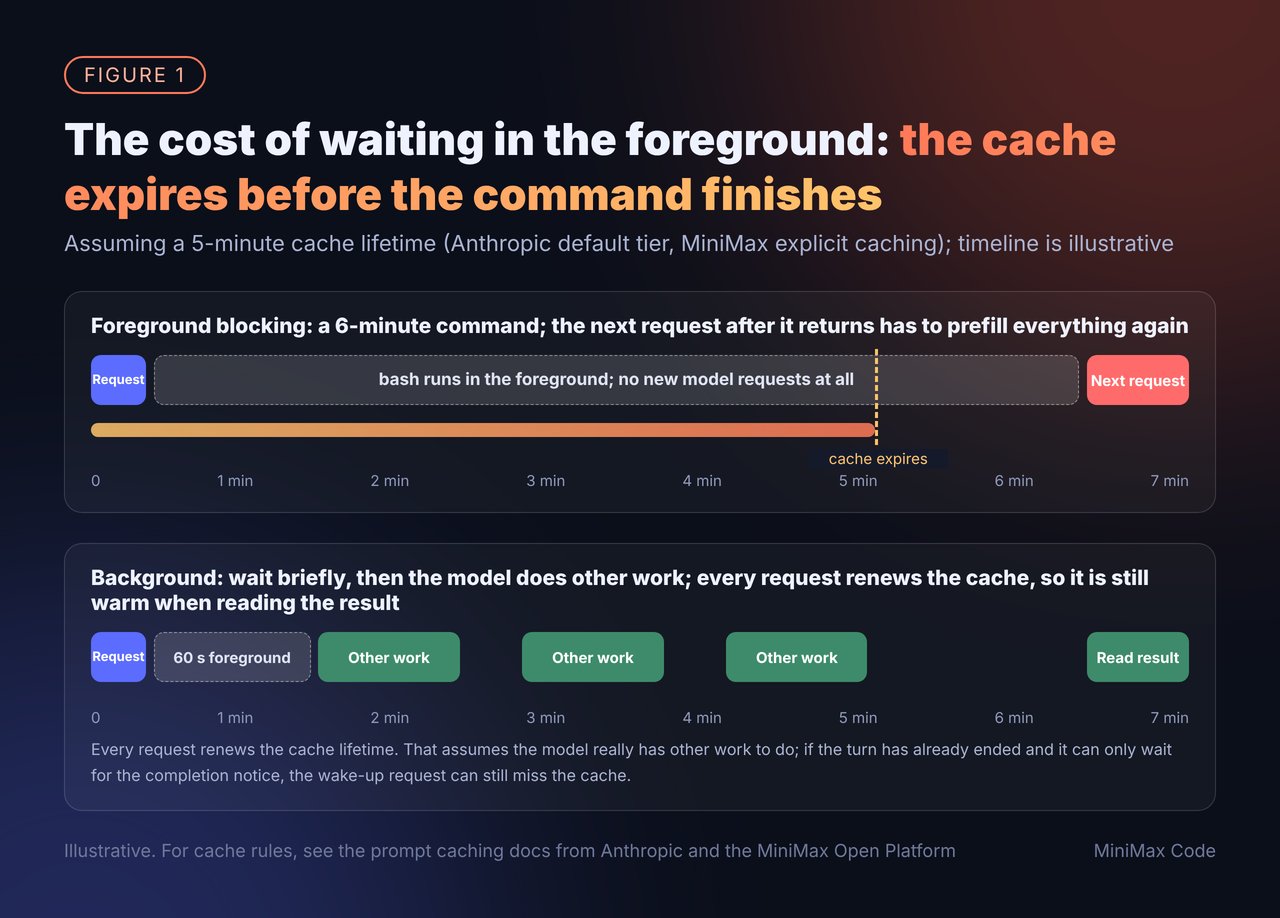
- Anthropic caches for 5 minutes by default, renewed on every hit. The lifetime counts from the start of the request, so the time the model spends generating counts too. There’s also a 1-hour tier, but writes cost 2x the normal input price.
- OpenAI’s cache duration varies by model, ranging from 5–10 minutes of inactivity to longer tiers.
What MCode does: wait in the foreground for a while, move to the background if it’s not done, never rerun
Like Claude Code, MCode’s bash has arun_in_background parameter: if the model expects a command to take a long time, it runs it in the background and gets a task_id back right away.
That alone isn’t enough, because the model often guesses wrong. It thinks something will take a few seconds, and it runs for ten minutes. So we added another layer: “auto-backgrounding.” The key implementation detail is just one thing: every foreground command starts as a background task from the very beginning; the foreground just waits alongside it for a while.
Next question: when it finishes, how does the model find out?
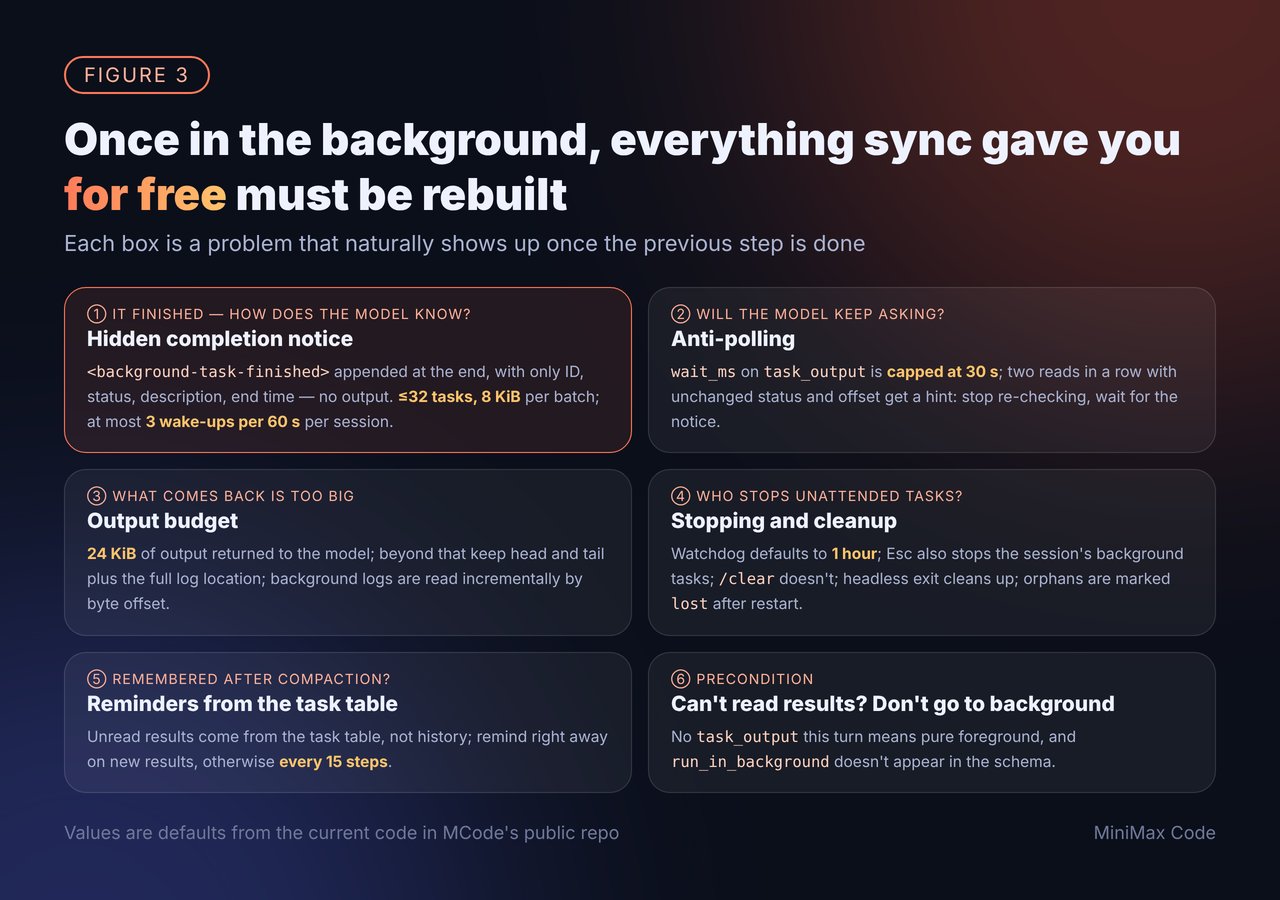
When a background command finishes, the runtime injects a hidden message,<background-task-finished>, into the session to wake it up. The message carries only the task_id, status, description, and end time, not the output. If the model wants the result, it has to call task_output itself.
There are two reasons for this.
First, notifications need to be short: at most 32 tasks and 8 KiB per batch, with descriptions over 256 bytes truncated.
Second, a notification is a new message appended at the end, so it never changes the cached prefix.
If lots of tasks in one session are finishing at the same time, notifications are rate-limited too: each session can be woken at most 3 times per 60 seconds, and anything beyond that is deferred. Failed deliveries are retried after 1, 2, and 5 seconds, then back off to 60 seconds, for up to 5 minutes.
The question after that: will the model keep asking on its own?
Yes, and it’s expensive. Once it has a task_id, the model can easily write a loop like this: check, not done yet, check again… Every check is a full model request carrying the entire context. Others have hit this too. Someone on X described a fix in another open-source agent: one heavy user’s agent issued roughly 1,900 wait calls in a month against a single quiet background process, each one a request of more than 200K tokens; after switching to automatic notifications, token consumption on the small model dropped by 45%.That matches our own conclusion: let results come back on their own, rather than having the model go ask.
- The tool description says it outright: you’ll be notified automatically when it finishes, so don’t poll frequently.
task_outputcan take await_msto block until new output arrives, but for at most 30 seconds; anything longer is treated as 30 seconds.- If the model reads the same status and offset twice in a row, the result comes with a hint: if you want to wait for new output, pass
wait_ms; don’t keep checking immediately; go do something else and wait for the completion notification.
What if what comes back is too big?
Output returned to the model in the foreground has a 24 KiB budget. Anything over that keeps the beginning and the end, elides the middle, and includes the location of the full log. Background task output is written to a log file, andtask_output reads it incrementally by byte offset, so the model can read only what’s new. If the log wasn’t fully written, the model is told that separately, so it doesn’t mistake incomplete output for the whole thing.
Who stops a background task nobody is watching?
The biggest risk with background tasks is that nobody is looking after them. Users feel this very directly. A Claude Code user on X put it bluntly: “Please fix it that whenever you stop the main claude code agent that it also stops all background tasks including sub agents.” When users press stop, they want everything to stop; but when they just step away for a moment, they don’t want long tasks killed for nothing. We handle each scenario separately:- Watchdog: an explicit background command with no timeout runs for at most 1 hour by default. In the public code, this value was raised from 30 minutes to 1 hour.
- User presses Esc to stop: this also cancels the background bash commands and subagents owned by that session (#381). Tasks stopped this way don’t wake the session when they end. Their results are still kept, and the model is told about them through a reminder on the next turn.
/clearor switching sessions: only the current turn stops; background tasks keep running. A user stepping away doesn’t mean they don’t want the result anymore.- When a headless one-shot run exits: all background bash commands in that process are cleaned up; otherwise a long loop would keep the CLI hanging instead of exiting.
- Process restart: on startup, tasks left behind by the previous process that no longer have an owner are marked
lost, so they don’t show as “running” forever.
After the context is compacted, does the model still remember there’s an unread result?
When the context gets too long, compaction squashes early history into a summary. If “a background task finished and nobody has looked at it yet” lives only in the history, one compaction and it’s gone. Our approach: the source of truth for unread results is the task table, not the history. Each time a request is prepared, the runtime checks the task table for tasks that have finished but haven’t been read. If there are any, it adds a<background-task-completion-reminder> listing the oldest few. When a new task finishes, the reminder goes out right away; otherwise the model is reminded once every 15 steps. Once the model successfully reads task_output, there are no more reminders for that turn.
One last precondition: if you can’t read the result, don’t go to the background
Bash is allowed to move to the background only iftask_output is among this turn’s tools. Otherwise it falls back to the pure foreground mode from the beginning (120 seconds by default, 300 at most), and the run_in_background parameter doesn’t even appear in the schema. If a command goes to the background but the model has no way to get the result back, it’s better to just wait for it.
Looking back
A self-check list for agent builders
All of this lives in MiniMax Code’s public repo, mainly under
packages/local-runtime/src/background-task/ and packages/agent-tools/src/desktop/.
References
- Vibecodepipe (@Vibecodepipe), Common ways agents fail: the dev server that never returns
- Claude Code docs, Background Bash commands
- johnnynelai (@johnnynelai), A rundown of Claude Code shortcuts, including Ctrl+B
- Anthropic docs, Prompt caching
- MiniMax Open Platform, Caching for the Anthropic-compatible API, Prompt Caching
- OpenAI docs, Prompt caching
- ZYPHER (@ZypherHQ), Wait too long on builds and tests and the cache expires
- wallabytoken (@wallabytoken), The “pause tax” in a 2.3-hour session
- jus_eng_njainam (@jus_eng_njainam), Repeated wait calls, and the effect of switching to automatic notifications
- 7izzyx (@7izzyx), Asking for background tasks to stop when the main agent is stopped
- MiniMax Code, PR #381: Stop background tasks when stopping a session