

This time I want to look at context along the time axis: what happens as a session gets longer and longer.
Why agents get dumber as sessions get longer
What compaction is, and how everyone does it
Put simply, compaction means that when context is nearly full, you have the model summarize the conversation so far, replace the history with that summary, and keep going. It’s lossy: no matter how good the summary is, it can’t keep every detail of the original. The public implementations are broadly similar; the differences are in the details:- Claude Code: auto-compacts when nearly full, or you can run
/compactmanually with instructions, e.g./compact focus on the auth refactor, drop the test debugging. According to Anthropic, compaction keeps architectural decisions, unresolved bugs, and implementation details, drops redundant tool output, and then continues with the summary plus the 5 most recently accessed files. Lydia Hallie from the Claude Code team added on X that on 1M models, auto-compaction by default doesn’t trigger until around 967K — meaning every message before that is huge. You can use/autocompact 400kto make it compact earlier. She also described idle compaction: when a session sits idle and the prompt cache is about to expire (around 1 hour), it compacts first, so when the user comes back only the summary needs to be reprocessed. - Claude API: server-side compaction can trigger on demand, automatically at a token threshold, or be swapped out for your own summarization logic. You can keep the last few turns verbatim and customize the summarization prompt — in the docs’ words, for “when the default summary misses something a later turn needs.” There’s also the lighter-weight context editing: no summarization, just rule-based clearing of old tool calls and results. Anthropic calls clearing tool results the safest, lightest form of compaction.
- OpenAI: compaction in the Responses API can trigger automatically at a threshold, and there’s a standalone compact endpoint. One notable difference: the compacted output is encrypted and opaque — “not intended to be human-readable” — and carries prior state and reasoning. The compacted window keeps all user messages, followed by a compaction item.
- Cursor: Dynamic context discovery describes two ideas. First, write long tool outputs straight to files and let the agent read them when needed, so you’re forced to summarize less often. Second, when summarizing, leave the agent a reference to the full chat history file, so it can go back and search for details the summary dropped.
- Don’t summarize if you can avoid it (clear tool results first, write long outputs to files)
- When you must summarize, make it controllable (instructions, custom prompts, keep recent turns verbatim)
- When the summary drops something, make it recoverable (keep the raw history on disk)
Where compaction goes wrong
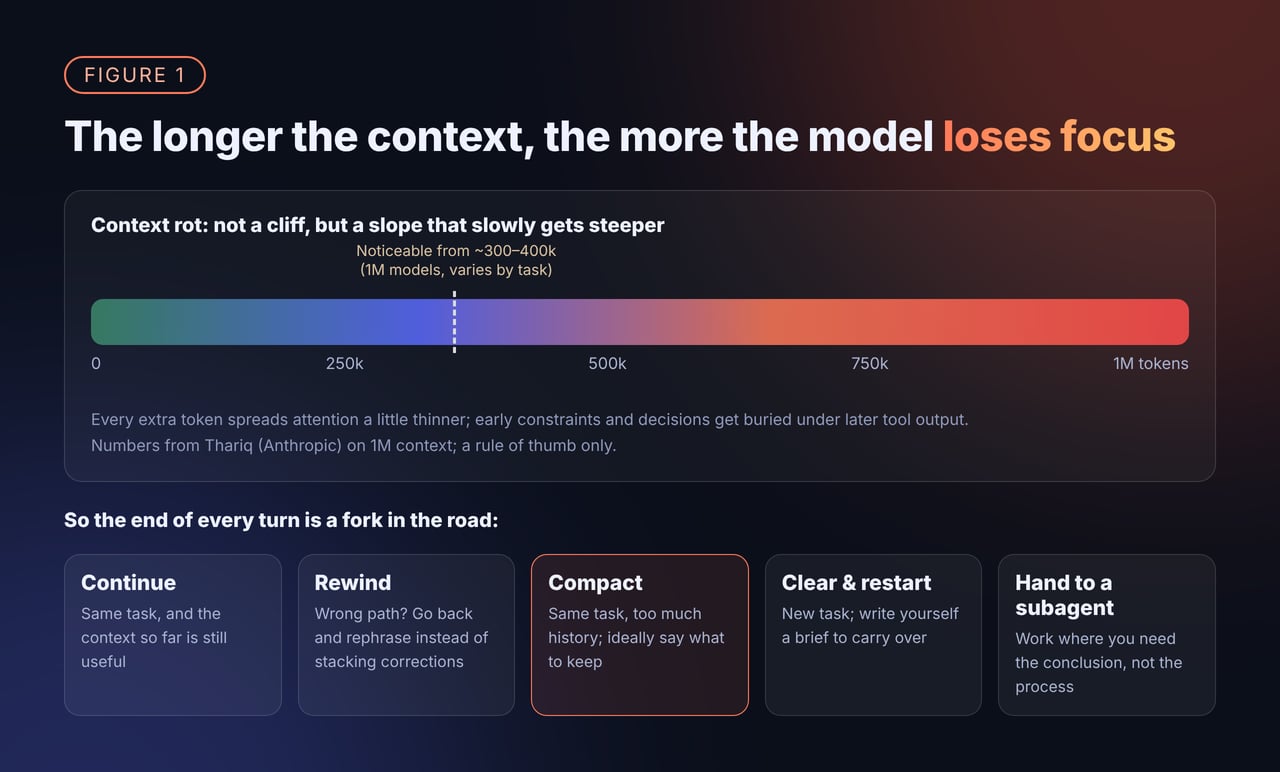
Use compaction enough and the failure modes become clear. Roughly four kinds: 1. Lost decisions and constraints. “Don’t touch the public API” or “tests must use a real database,” said at the start of the session, may be down to one line in a summary dozens of turns later — or gone entirely. Claude Code’s docs put it plainly: instructions given only in conversation may be lost after compaction; rules written in CLAUDE.md at the project root are re-read from disk and re-injected after compaction. 2. Details get summarized away. Thariq gives an example: after a long debugging session, auto-compaction kicks in and summarizes the debugging. Then you say “now go fix that warning in bar.ts” — and that warning is exactly what the summary left out. The root cause is that the model can’t guess what you’ll want next when it compacts. He also points out something easy to miss: because of context rot, the moment the model compacts is exactly when it’s in its worst shape.His advice: with a 1M window, don’t wait for auto-compaction. Compact proactively, and say what you’re going to do next.
One line from an internal discussion of ours stuck with me: “Memory is a summary too.” In other words, trying to fix one summary by writing a better summary often doesn’t work.
And the context the model sees is not the same thing as the conversation history the user sees in the UI. Compaction should only change the former; it shouldn’t make the user’s history vanish.
Compact what to compact, drop what to drop, write down what to write down
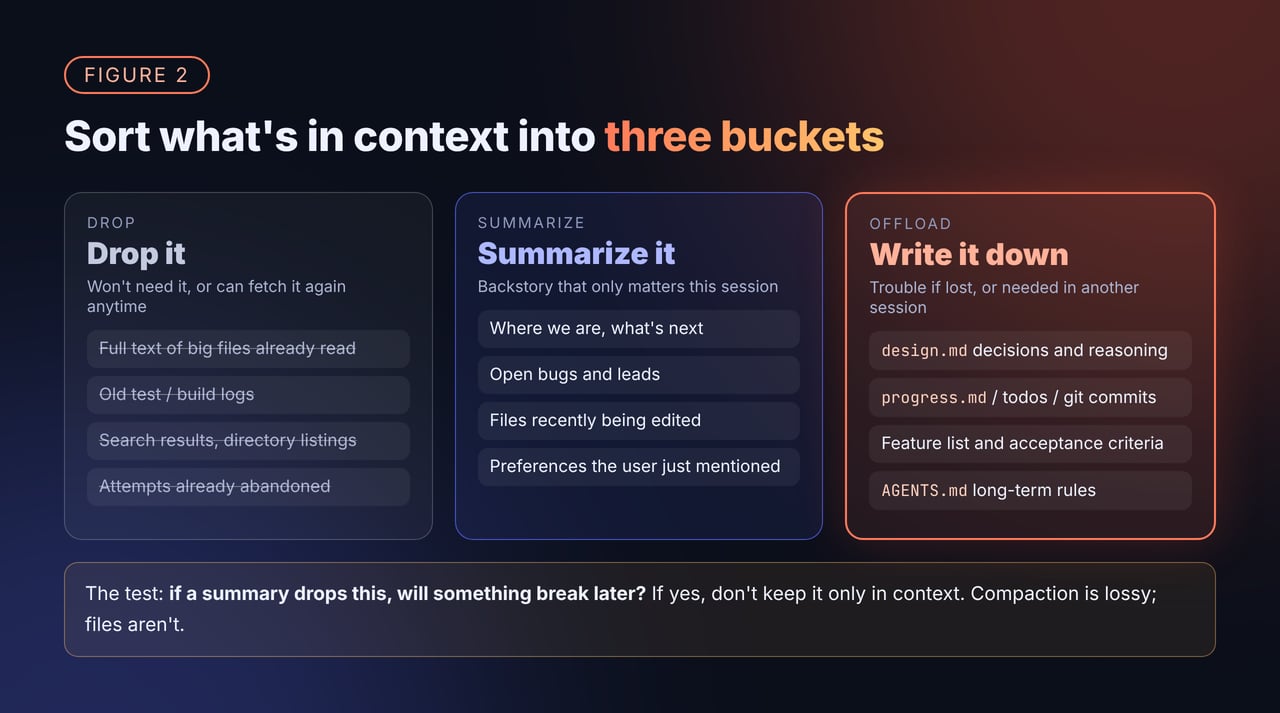
- Drop it: things you won’t need, or can fetch again anytime. Big files already read, test logs, search results, abandoned attempts. Clear these first — context editing or clearing tool results is enough, no need to bother the summarizer. Thariq’s test for whether to hand work to a subagent applies here too: will I need to look at this tool output again, or do I just need the conclusion?
- Summarize it: the backstory that only matters within this session. Where you are, what’s next, open bugs and leads, which files you’ve been editing. This is exactly what compaction is good at.
- Write it to a file: things that cause trouble if lost, or that you’ll need in another session. Design decisions and the reasoning behind them, progress, to-dos, acceptance criteria, long-term rules.
When to start a new session instead of compacting
Compaction fits “same task, just too much history.” In these cases, a fresh session is often better:- You’ve switched tasks. Thariq’s rule of thumb is “new task, new session.” The debugging and tool output from the last task is mostly noise for the next one. There’s a gray zone — say you just finished a feature and want to write its docs — where keeping the context might be easier.
- You’ve compacted several times and it’s starting to drift. Rather than keep stacking on a drifting summary, have the agent write a handoff doc first: goals, decisions made, current progress, next steps, pitfalls to watch for. Then clear, and start a new session with that doc. Thariq calls this writing your own brief: a bit more effort than compacting, but what carries over is exactly what you think matters.
- You’re heading the wrong way. That’s when to rewind, not compact. Compaction would fold the failed attempt into the summary.
How compaction and memory split the work
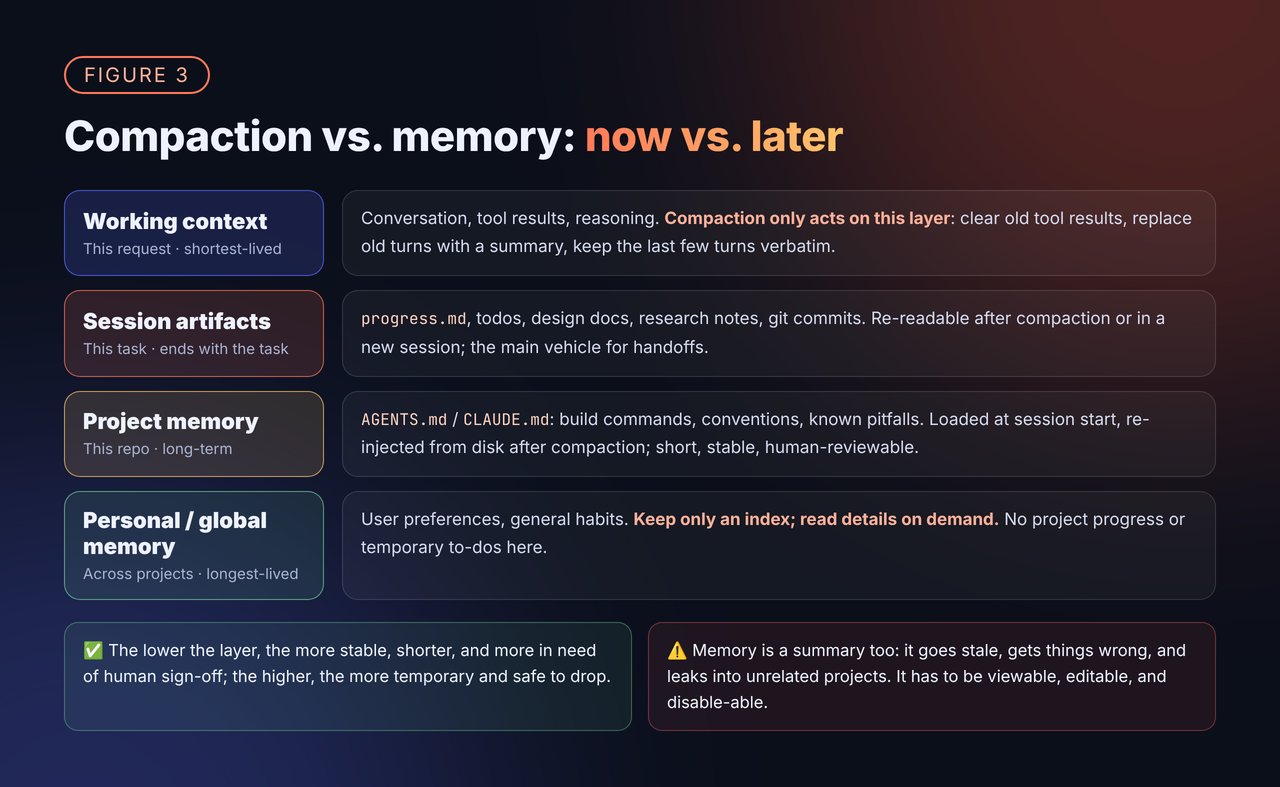
- Working context: the conversation, tool results, and reasoning in the current request. Compaction and context editing only act on this layer.
- Session artifacts: progress files, todos, design docs, research notes, git commits. They follow the task and can be archived when it’s done; they’re the main vehicle for handoffs.
- Project memory: files like
AGENTS.md/CLAUDE.md— build commands, code conventions, known pitfalls. Loaded at the start of every session and re-injected after compaction. Claude Code recommends keeping this file under 200 lines, and only adding to it when, say, the same mistake has happened twice. - Personal / global memory: preferences and habits across projects. Claude Code’s auto memory is one approach:
MEMORY.mdis just an index, only the first 200 lines or 25KB load at session start, and the actual content lives in topic files read on demand. Anything that can be inferred from the code doesn’t get recorded.
AGENTS.md.
Memory is a summary too, and it can be wrong — so it has to be viewable, editable, and disable-able. Claude Code’s docs have a reminder: CLAUDE.md is context, not enforcement; rules that must be enforced belong in hooks. Same with memory: it’s a hint to the model, not the truth, and ideally a plain-text file a human can open directly.
When Anthropic launched context editing and the memory tool, they shared some of their own internal eval numbers: on an agentic search eval, memory plus context editing improved on the baseline by 39%, context editing alone by 29%; on a 100-turn web search eval, token consumption dropped 84%. The exact numbers are highly scenario-dependent, but the direction is clear: the two together beat either one alone.
What we do in MCode, and where we got burned
A few of our own takeaways, mostly at the level of principles:- Let users decide when to compact. The default auto-compaction trigger leaves headroom for model output and the summary, but many users want to compact earlier so each request is smaller and faster. So we added a setting,
contextManagement.compactionTriggerAt(PR #493), which you can set as a fraction of the window or an absolute token count. It can only move compaction earlier, never later, so requests don’t exceed the model’s input limit. - Compaction is an internal harness action and shouldn’t eat into the user’s budget. For example, when there’s a max-steps limit, compaction shouldn’t count as a step. Compaction changes the context the model sees, not the conversation history the user sees.
- Tell the model compaction exists. We’ve seen agents halfway through a long task say “context is almost full, I’ll continue next turn,” as if they had no idea the system would compact for them. The harness should spell it out in the prompt: context is managed automatically, write progress to files, and keep going.
- What users actually want is often a handoff, not compaction. Plenty of users have the habit of asking the agent to write a handoff doc and then starting a new session. That tells you a controllable, readable handoff inspires more confidence than an invisible summary.
All the techniques side by side
Self-check list
- Are old tool results cleared first, rather than summarizing everything right away?
- Are the key decisions and constraints from the session written to files, rather than living only in the conversation?
- When compacting manually, do you tell the model what’s next and what to keep?
- Does the auto-compaction trigger leave enough headroom for output and the summary? If compaction fails, can the session continue?
- Do compaction requests hit the cache? Does compaction frequency keep invalidating it?
- Do you start a new session when switching tasks? After several compactions, do you switch to a handoff doc?
- Are AGENTS.md / CLAUDE.md short enough, holding only long-term, stable rules?
- Is memory scoped? Are transient progress and to-dos kept out of long-term memory?
- When memory exceeds its budget, is truncation obvious, and are the most important rules guaranteed to load?
Closing thoughts
Looking back, the first two posts were about saving context in space; this one is about managing context over time. The principle is the same: Give MiniMax Code a try, and come talk to us on GitHub about how you handle long sessions, compaction, and memory. We’d love to hear how other teams are doing it.References
- Anthropic, Effective context engineering for AI agents
- Anthropic, Effective harnesses for long-running agents
- Anthropic, Managing context on the Claude Developer Platform
- Claude API docs, Compaction
- Claude Code docs, How Claude remembers your project
- OpenAI docs, Compaction
- Cursor, Dynamic context discovery
- Thariq (@trq212), Using Claude Code: Session Management & 1M Context
- Lydia Hallie (@lydiahallie), The auto-compact trigger and /autocompact, idle compaction
- Dex Horthy (@dexhorthy), Put all context into artifact docs, Where to wrap up a long session
- MiniMax Code, PR #493: contextManagement.compactionTriggerAt